If you enjoy creating new and creative AI videos for Instagram Reels, YouTube Shorts, or other social media platforms, then the Hey Bhagwan Trending AI Prompt is something you should definitely try. This video trend is getting attention because of its unique concept and impressive AI-generated visuals. The best part is that you don’t need to spend hours editing clips or learning complicated video editing techniques. With the help of Google Flow, you can create a beautiful video simply by using the right prompt. Just open Flow, copy the Hey Bhagwan AI Prompt shared below, and paste it into the prompt box to get started. Follow the instructions and let the AI create your video. Once the generation process is complete, you can preview the result and use it for your social media posts. So, if you also want to try this trending AI video style and create something different from your regular Reels, give this prompt a try!

What Is Google Flow
Google Flow is an AI-powered video creation tool from Google that helps users turn simple ideas into creative video content. It allows creators to generate cinematic scenes using text prompts and images without needing advanced video editing skills. You can use it to create short clips, storytelling videos, social media content, and other creative visuals. Google Flow is useful for beginners as well as content creators who want to experiment with AI video generation. By writing a clear prompt and providing suitable images when needed, users can create unique videos with different styles and effects. It can be a helpful option for making engaging content for platforms like Instagram Reels and YouTube Shorts.
Hey Bhagwan Trending Ai Prompt 2026
ai prompt
10 seconds, 9:16 vertical, realistic bright phone-camera look, warm vivid colors, real-time speed. EXACTLY 4 SHOTS joined by hard cuts at 2.5s, 5.0s and 7.5s. The video OPENS directly on Shot 1 (the golden temple) — the first frame is the temple scene, never a close-up portrait of @image1.
@image1 is ONLY a face/outfit reference — it is never shown as a frame, never used as the opening image, never appears as a photo in the video. THE PERSON = the person in @image1, the only human. Exact same face, gender, age, skin tone, hairstyle and body as @image1 in every shot. Outfit exactly as in @image1 (if the lower body is not visible: dark grey wide-leg jeans and white sneakers); same outfit in all 4 shots, no jewelry added.
CAMERA (all shots): invisible, locked-off, no movement, straight-on at chest height, about 3 m away, full body head to shoes, THE PERSON centered.
THE THAR: a glossy black MAHINDRA THAR (Indian 3-door off-road SUV) — NOT a G-Wagon, NOT a Jeep. Flat clamshell bonnet, black grille with six tall vertical slots, round headlights touching the outer ends of the grille, no chrome, no badge, chunky black bumper with round fog lamps, black wheel-arch cladding. On the front bumper, where a number plate would be: a black plate with “THAR” in silver capital letters. This plate exists ONLY on the Thar.
THE MERCEDES: a shiny brand-new white MERCEDES-BENZ top-luxury sedan, latest model: long low body, slim LED headlights, a large tall chrome grille of many thin vertical chrome bars, Mercedes three-pointed star on the front, black multi-spoke wheels. Plain white blank number plate — never “THAR”.
SHOT 1 — 0.0 to 2.5s — GOLDEN TEMPLE
Golden temple-palace interior: carved gold pillars, hanging brass oil lamps, red velvet curtains, patterned red carpet. Lower-left foreground: golden plate with a lit diya and marigolds.
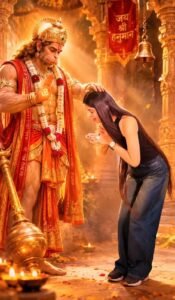
Side view. LEFT 60% of frame: Lord Krishna (blue skin, golden crown with peacock feather, flower garlands, yellow dhoti, green shawl) LIES RECLINED on a long red-and-gold velvet divan, propped on his left elbow on a round red bolster, head resting in his palm, calm gentle smile; his right leg comes down over the front edge so his bare blue foot hangs above the carpet. RIGHT side: THE PERSON sits low on the carpet, legs folded to one side, body turned left toward Krishna, both hands holding and gently pressing his foot.
0.0–1.0s: THE PERSON looks down at the foot with a devoted smile, pressing it.
1.0–1.5s: THE PERSON looks up dreamily; three small glowing white dots rise above their head.
1.5–2.5s: a VERY LARGE dream bubble pops in, filling the top 45% of the frame, with a soft glowing white halo border (not a flat cartoon cloud). Inside it, a full-color realistic photo: THE THAR, front three-quarter view, parked in front of a house with plants, roses on roof and bonnet, “THAR” plate visible. THE PERSON keeps smiling up at it.
SHOT 2 — 2.5 to 5.0s — STREET
Indian street with shops and a cream building; on the left a big tree wrapped in strings of hundreds of tiny warm golden fairy-light bulbs (small dots of light, not neon tubes or LED strips); grey paver ground covered with red rose petals. The location stays exactly the same for the whole shot — only the vehicle changes.
Behind THE PERSON, filling the frame width, head-on: THE THAR decorated as a wedding car — bonnet covered in red, white and pink roses, rose arch on the roof, two pink tulle bows on the bumper, “THAR” plate visible.
2.5–3.0s: THE PERSON stands relaxed, one leg crossed in front of the other, slight smile.
3.0–3.25s: white electric lightning crackles around THE PERSON and the Thar.
3.25–3.75s: THE PERSON gets startled — mouth open “O”, knees bend, arms fly out; a burst of realistic semi-transparent white smoke swirls around them (THE PERSON stays visible).
3.75–4.0s: the smoke clears: the Thar with all its flowers, bows and THAR plate is completely gone; in the same spot stands THE MERCEDES, front three-quarter, decorated as a wedding car: a BIG round bouquet of red and white roses sits on the middle of its bonnet, clearly visible beside THE PERSON’s shoulder, and a pink ribbon runs to a pink bow on the door. The bonnet is never plain.
4.0–5.0s: THE PERSON straightens up amazed, then stands with hands clasped at the waist, shy happy smile.
SHOT 3 — 5.0 to 7.5s — GYM
Dark modern gym: black rubber floor, crossing white LED strip lights on the ceiling, dumbbell racks on the left, tall black poster on the right reading “NO PAIN NO GAIN” with a yellow dumbbell icon.
5.0–5.75s: THE PERSON holds a silver barbell with big black plates straight overhead, big smile.
5.75–6.25s: lowers it to the waist.
6.25–6.5s: drops it; it lands on the floor in front of the feet.
6.5–6.75s: raises both arms into a double biceps flex.
6.75–7.5s: FUNNY MAGIC: both sleeves puff up like balloons — the upper arms swell into big round biceps bulges about twice as thick, clearly visible, but ONLY under the fabric: the full-length sleeves stay on down to the wrists, stretched tight. No bare skin. THE PERSON laughs proudly holding the flex.
SHOT 4 — 7.5 to 10.0s — MONEY PALACE
Grand golden hall, huge crystal chandelier at top center, cream-and-gold walls with balconies. The whole floor is buried in banknote bundles — knee-high around THE PERSON, rising into big piles behind them up to the back wall; no floor visible. Heavy shower of loose notes falling the entire shot.
7.5–8.25s: arms wide, palms up, looking up at the falling notes, delighted.
8.25–9.0s: big laugh, tossing notes into the air.
9.0–10.0s: laughs at camera, arms loose, notes still falling.
AUDIO: soft upbeat instrumental music, a whoosh at the bubble, crackle and poof at the transformation, a thud when the barbell lands, fluttering notes. No dialogue, no voice, no singing, no lip-sync.
STRICT RULES — follow the prompt literally:
– Generate ONLY what is written. Do not add any object, person, vehicle, prop, effect, text or action that is not described. Do not skip or change anything that is described.
– No other humans (no bystanders, shopkeepers, reflections). Lord Krishna appears only in Shot 1.
– No tripod, phone, camera or equipment visible. No close-up portrait opening.
– Only allowed text: “THAR” on the Thar’s bumper and “NO PAIN NO GAIN” on the gym poster. Shop signs are blank. No captions, emojis, watermarks.
– The Thar never looks like a G-Wagon or Jeep and never has chrome or a star. The Mercedes never has “THAR” or a black plate.
– Shot 1: Krishna lying on the left, THE PERSON sitting on the right facing him — never cross-legged facing camera.
– Shot 3: arms grow only inside the sleeves — no bare arms, no torn or short sleeves, no veins.
– Effects allowed only: bubble glow, lightning and realistic smoke in Shot 2, falling notes. No fire, no sparkles, no cartoon smoke.
– No camera movement, no extra shots, no changes to shot order or cut times. Same face, hair and outfit in every shot.
How To Use Ai Websites
Using the Google Flow AI website is quite simple, even if you have never worked with AI video tools before. First, open the official Google Flow website in your browser and sign in with your Google account. After logging in, you can start a new project and explore the available AI video creation options.To create a video, you need to describe the scene you want in the prompt box. Try to mention important details such as the subject, location, camera movement, lighting, mood, and overall visual style. A clear and detailed prompt can help you get a better result. Depending on the available options, you can also use an image as a reference for creating your video.After entering your prompt, submit it and wait while Flow generates the scene. Once the video is created, you can review the result and make changes if it does not look the way you expected. You can try different prompts to improve the scene or create additional clips for your project.Google Flow can be useful for making cinematic clips, short videos, storytelling content, and social media posts. With a little practice, you can learn how to write better prompts and create more interesting AI-generated videos.
Conclusion
Google Flow is a useful AI video creation tool for anyone who wants to turn simple ideas into engaging visual content. With the help of text prompts and images, you can create different scenes without needing advanced editing or filmmaking skills. The process is fairly easy once you understand how to write clear prompts and adjust your ideas according to the results. Whether you want to make cinematic clips, short videos, social media content, or creative stories, Flow can make the process more convenient. If you are interested in AI video creation, you can give Google Flow a try and explore its features to create your own unique videos.